Your staff's remote access is under attack
It's time to replace your traditional VPN with something built for the way your firm works now: Zero Trust Network Access.
Imagine that you bring in a contract attorney for a single matter. She needs access to your offices for the next ninety days. In a perfect world, she would receive a key to one room. Instead, she gets a key to the entire building: every file room, every office, every cabinet, including the ones having nothing to do with her work. She would never misuse the privilege, but a key that opens everything is only as safe as the person holding it and the keychain they’re holding it on.
That would never happen, right? OK, now imagine we’re talking about remote access to your network.
Remote access quietly runs your firm now
Think about everything your firm trusts to remote access. Associates working from home or a courthouse hallway. A vendor who needs access to a single system for one project. Staff connecting through hotel and airport wi-fi you don't control and can't see. And for many law firms there's one more: using a Virtual Private Network (VPN) to mask the firm's own IP addresses during sensitive case or competitive research, so opposing parties never see what you're looking into. Every one of these is a door into your practice. The real question is what happens once someone walks through it.
Your old VPN trusts whoever knocks
Your current, traditional VPN, whether it's sitting at the edge of your network or inside your firewall, was built to verify connections and then step aside. Once a user is in, the old model essentially says "trust me, bro" and gives them the run of the place. That's the contract attorney with the master key. It's also why a single set of stolen credentials, or one infected home laptop, can turn into a path straight into your systems. And the controls are blunt. Locking things down for the contractor usually means locking them down for everyone. And nobody wants that.
Zero Trust assumes nothing, then verifies everything
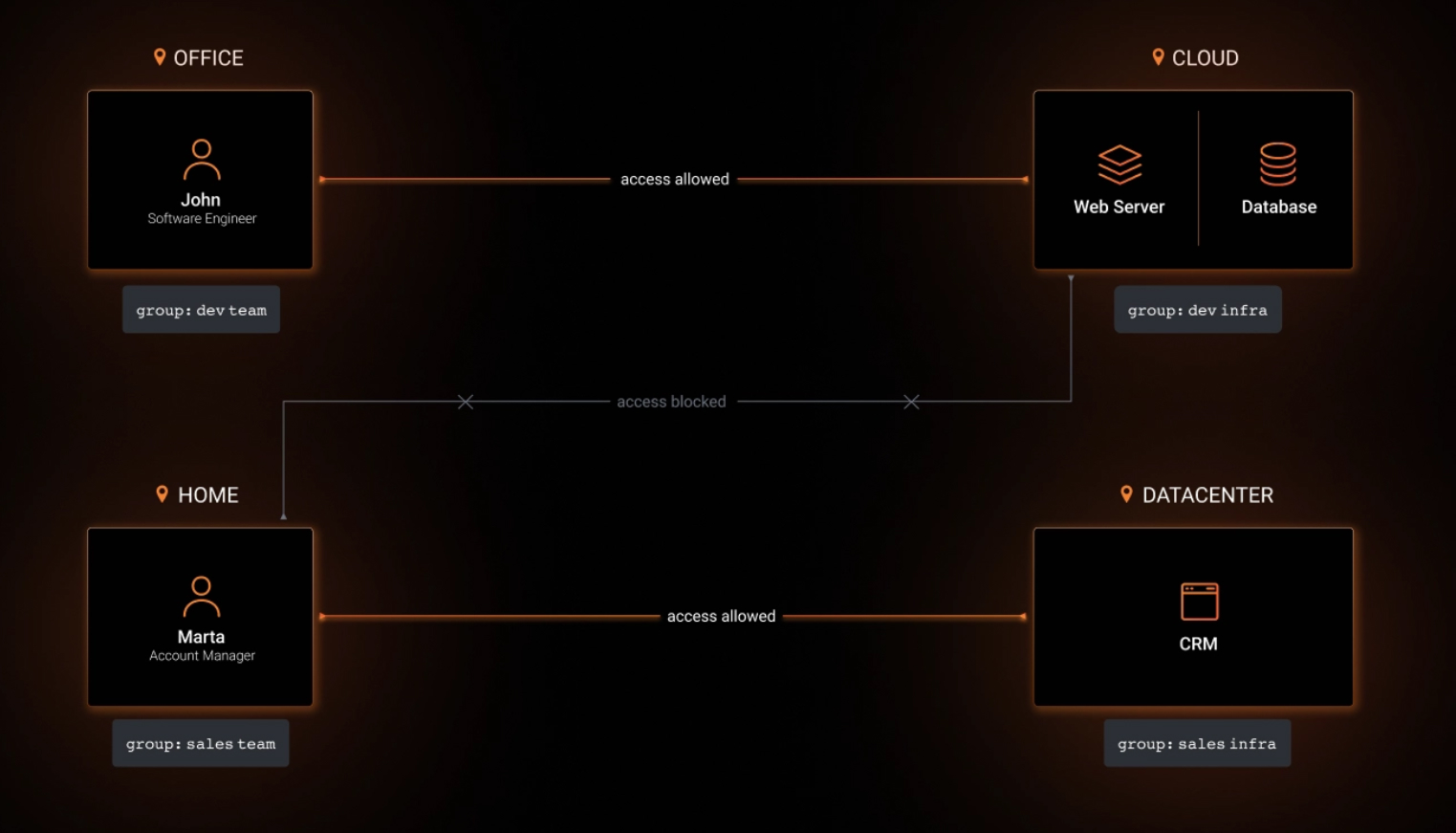
This is what Zero Trust Network Access (ZTNA) changes. The name is the whole idea. It trusts nothing by default: not the user, not the device they're on, not even the resource they're reaching for. Instead of opening the network, it grants one person access to one resource, under conditions you set. For example:
- A pre-approved device.
- Set access times.
- Multi-Factor Authentication (MFA) already satisfied.
Your contract attorney reaches the one application she’s permitted to work with and nothing else.
ZTNA handles two of your three remote-access needs, secure worker and vendor access and protection on untrusted wi-fi, better than your old VPN ever could. The third need, masking your firm's outbound queries during sensitive research, requires a separate tool to protect a separate job. Knowing which is which is exactly what your technology partner should be telling you. This is how you fortify remote access that was built for a more trusting internet.
A correct password isn't a safe machine
A login tells you someone typed the right password. It tells you nothing about the machine they typed it on. So we add a layer. For example, we connect NetBird, the Zero Trust platform we've added to our curated partner portfolio, to Huntress, the Endpoint Detection and Response (EDR) tool already watching client workstations for indicators of compromise. Now access depends on the device itself being recognized, current, and clean. A machine that doesn't meet that standard doesn't get on, no matter how correct the password is. That's how we un-risk remote access rather than simply enable it.
We curate our partners, on purpose
Most providers choose partners by margin, reselling what pays them best as long as the support holds up. We work the other way around. We start with the best technology, service, and support for your firm, and only then form what we call a curated partner relationship.
NetBird earned its place. It's open source, so its security isn't something you take on faith. The code is open for anyone to inspect, the way knowing how a lock is built tells you whether to trust it. It carries certifications that regulated work inside law firms, healthcare practices, and financial services firms demand: SOC 2 Type II, DORA, ISO 27001, and GDPR. And it operates the way we already do, on least privilege, verified at every step. Choosing a vendor you can actually inspect is itself a form of vendor risk management, part of the compliance posture your firm carries either way.
We're glad to curate NetBird into our portfolio as an authorized reseller.
One last question worth asking yourself
If someone logged into your firm's systems right now, from a device you have never secured, on a network you have never seen, what would stop them before they reached your client files?
If the answer is “their password, and then nothing,” it is time for a call.
Cypress Grove Technologies is the Strategic Growth Infrastructure and Risk Mitigation Partner for professional services firms in New York. If you're not certain what your firm's remote access actually allows once someone is connected, we're happy to walk through it with you and show you where the open doors are.

Your firm's biggest security gap may be sitting in your chair
You've told your staff a hundred times to watch for scams. Then an email arrives for you. Are you ready?

What does one day of downtime actually cost your firm?
You probably think your firm could ride out a week. Then you have one.

When does it make sense to switch your IT team?
Decision fatigue, analysis paralysis, and risk leaks can stall your decision and cost you more than money.